So…I think this is a bug. I’m creating a new work area then trying to combine, them. Everything saves when I click save, (it creates the new work area, then allows me to combine them. Shows the preview for the combine, and then allows me to save. HOWEVER…when it goes thru the process without errors and does the backup and restore, it never combines or pushes the combined areas back to the mower. It still treats them as seperate areas no matter how many times I try to combine it. I’ve tried this on two different areas. I “think” this may be a glitch or bug that only happens when an area has been split and then you try to add a work area to that. As another area which I didn’t split from, I can attach a work area and combine without issue.
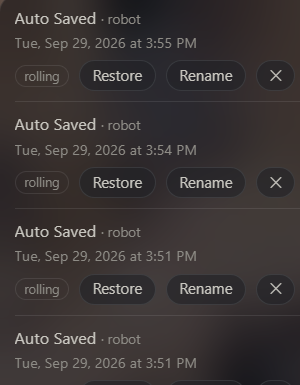
It’s been fixed in a beta release and should be out for the public shortly. Deleting a couple of the backups in the map editor should allow you to continue, just find a backup you don’t need anymore and click the x next to it
thanks, got it. Wierd.
1 Like
@gfmedia the fix for this is out now in 1.0.19. Each Combine used to keep a backup of its own on the robot that never got cleared, so after a few tries the robot’s 10 backup slots were full and it refused the next Combine. Combine now uses Yardstick’s own safety backups, which clear themselves, and if the robot’s backup slots are ever full, the map editor tells you so with a button that takes you to the backups.
Update from Settings, Check for updates if it hasn’t come through yet.
2 Likes