How do you perform a Pause and Return to Dock for the current Program. I had a quick rainstorm come through. I just wanted it to go home for a couple hours until it passed. All I’m seeing is Stop and Return to Dock. Maybe I’m missing something simple? If I do this through the Yarbo App. I think Yardstick will tell it to continue at the 80% charge state. Is that correct?
You are not missing anything. There is no single “go home now and carry on later” button in Yardstick today, and a passing shower is a good reason to want one.
Here is what the buttons on the Plans page (and the phone view) do while a job is running:
- Pause holds the robot where it is. Resume carries on from there. Good for a few minutes, not for sitting out in the rain.
- Stop & send to dock ends the job and sends it home. Yardstick will not send it back out afterwards. The program runs again at its next scheduled time, or you can start the plan again yourself when the rain has passed.
On your question about the Yarbo app: if you send it home from the app, what Yardstick does next depends on the battery at the moment it stopped.
- At 80% or more, Yardstick assumes something other than charging stopped it and leaves it alone. It tells you so and waits for you.
- Below 80%, it looks like a normal trip home to charge, so once the battery is back up Yardstick would send it out to finish from where it left off. In a rainstorm that is probably not what you want.
So for a shower today, the dependable way is Stop & send to dock in Yardstick, or end the job (not just pause it) in the Yarbo app. Either one tells Yardstick a person stepped in, and it stays home until you start it again.
A proper “send home and hold until I say carry on” button, one that keeps your progress, is a good idea and I have added it to our list.
3 Likes
Thanks Mike. As a follow-up It was 1-3/4 areas of 3 complete when I had to Stop and Return Home. How do continue from that point? I think I know the answer 
You are correct, no option right now. It does raise a good idea however…that’s a longer tent pole to stand up but we might be able to come up with something…more to come.
1 Like
@CobraDunn the “more to come” is here. 1.0.19 adds Pause & go home on the Plans page: the robot goes to charge and the job stays open, then Resume sends it back out to finish where it left off. Just right for a passing storm.
Update from Settings, Check for updates if it hasn’t come through yet.
Mike
2 Likes
@Mike How do I cancel the remainder of a Program that is currently suspended due to curfew?
I started a Program encompassing three Areas. During the mowing of Area #2, MISS-DIG showed up and planted a dozen flags throughout my 3rd Area in the Program. The wires supporting these flags have damaged my mower in the past so I need to absolutely positively cancel the active Yardstick Program. Unfortunately, the nightly curfew was reached so the Mower is on the dock waiting to complete Are #2 and I can’t find any [END] buttons on YS screens to keep from continuing at 5:00a.

I turned on Yardstick’s handling the Programming and it still shows that my Yarbo will awake at 5:00a and continue mowing.
@GROWF good call stopping it before morning. Turning Yardstick scheduling off won’t do it: a program started by hand keeps going until it finishes or the job is ended, and quiet hours only pause it.
To end it tonight:
- Open the map page in Yardstick. The card at the top left should say Paused · charging, with Resume and End job.
- Press End job. That ends the job on the robot, and Yardstick drops the rest of the program, so it will not go back out at 5:00.
- Check the Activity on the Schedule page. It should say the job was ended during quiet hours and Yardstick will not send it back out.
You can also end the job in the Yarbo app instead. End it, don’t just pause it.
THANK YOU for responding so late in the evening.
The top left of the Central Command nor the Schedule or Plan pages had the Resume or End job buttons. I’ve seen them before so I knew what to look for. I went to those pages first and re-reviewed them multiple times (I’m not ruling out pilot error on my part).
The Yarbo app also didn’t have a End option because the mower was on the charging pad and was not handling the scheduling (again might be pilot error missing that).
I temporarily addressed the situation by powering down my Yarbo. When I get up in the morning I’ll power up my Core and see where things sit.
@GROWF here’s how it works. When a job is open on the robot, Yardstick’s map page shows Resume and End job, and the Yarbo app shows the job as well. When neither of them shows anything, there is no job open on the robot: it has been ended.
The Schedule page follows the same job. Once it’s ended, the Paused card at the top of the Schedule page clears too.
So in the morning, glance at the Schedule page. With nothing in the Yarbo app and no Paused card in Yardstick, the job is completely ended, and you can power your Yarbo up and use it as normal. You can power it on now, it didn’t need to be powered down. If you have nothing scheduled in the AM, nothing will run.
For next time, ending a paused program will get its own button on the Schedule page in the next update, so it’s one click from there.
1 Like
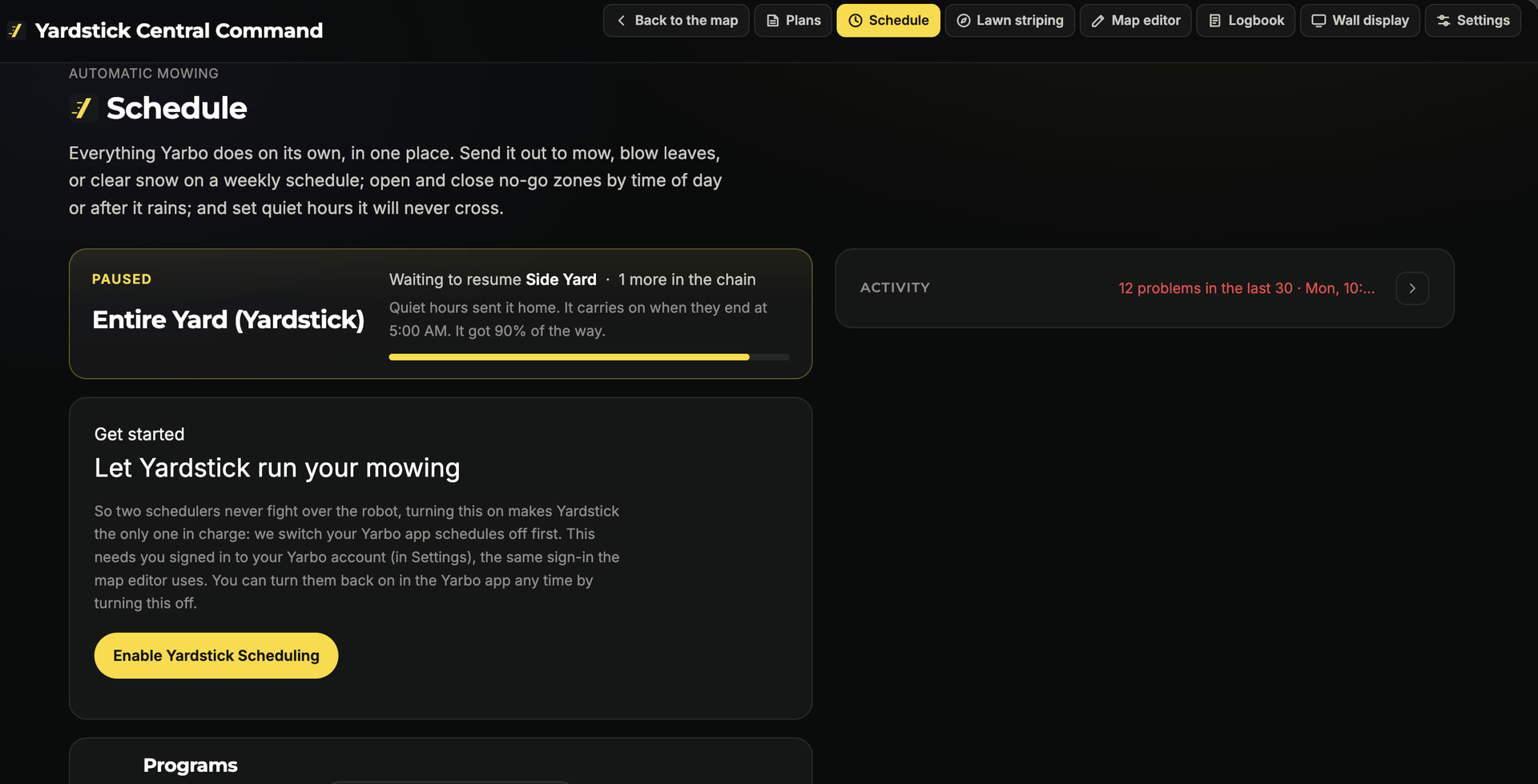
@Mike I did a screen capture showing the Command Center and Schedule screen. As you will see Command Center does not show [Resume] or [End job] yet on the Schedule screen you will see:
“Waiting to resume Side Yard · 1 more in the chain
Quiet hours sent it home. It carries on when they end at 5:00 PM. It got 90% of the way.”
Please point out my pilot error.
UPDATE: Keep in mind the mowing session reached the curfew and was on the charging station waiting until the next day. So Yarbo thought it was done yet Yardstick knows there is more to do.
@Mike disregard. After waiting several minutes (30~45 mins) the buttons have appeared on the Map screen. For what its worth the video does show the buttons missing even when I navigated between screens.
@GROWF - sorry we have not been able to reply as quickly as we might have liked, a few balls in the air the past few days.
We believe what you saw was a display issue that the status was not clearing itself, but the job was done. We are going to address it in the upcoming release.
Thank you for keeping us updated on it.