I know it was said that the plans would not get deleted if you delete a dead end or other elements if they are already in a plan but it just happened. Luckily not one with like 40 dead ends.
I had an area/zone in the plan and 5 dead ends. I rearrange the dead ends to try and be more efficient and deleted one. During the time I was editing I had explicitly closed the Yarbo app. I deleted one of the dead ends and saved in Yardstick. When I went into the Yarbo app to try and run my new tests the plan was gone.
EDIT: Nope it deleted the one with 40+ dead ends too, so that will be tough to recreate.
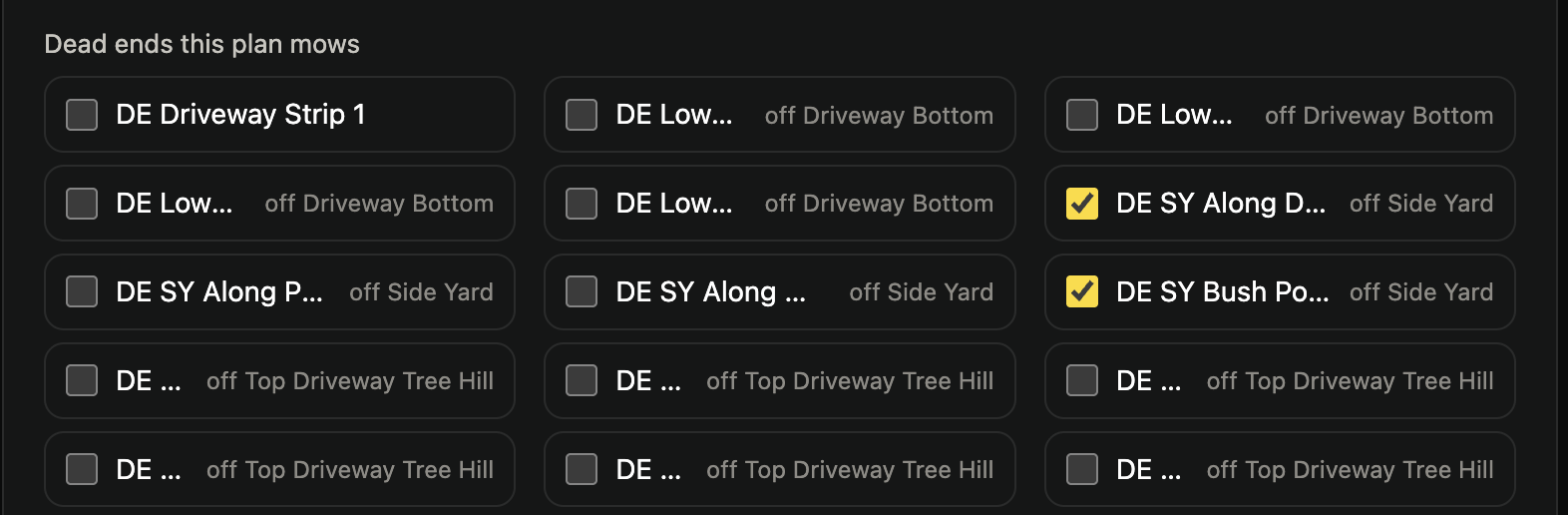
Anyway, that brings up a request. Can we make the listing of dead ends display the name? Most of mine just show "DE..(off {area})
Thanks for reporting this, and sorry you lost those plans, especially the one with 40+ dead ends. We will get you fixed up without a lot of work.
We’ll be straight with you: we’re not sure yet what removed them. We believe that what you are seeing is native functionality of Yarbo. Either way, we’re going to get to the bottom of it. First, let’s get you back up and running. Then we’ll get it fixed.
Getting your plans back
We’ll do this in two steps: first the map, then the plans.
Step 1: put the map back
Open the Map editor.
In the Backups & restore card, find the backup taken just before your edit. Yardstick takes one every time you save; its name starts with YS-auto followed by the date and time.
Click Restore and confirm.
This brings back the dead end you deleted. It also undoes any other map changes saved after that backup, like the dead ends you rearranged. If you want to remove that dead end again, hold off until we’ve worked through it in the ticket.
Step 2: put the plans back
Open the Plans page.
Find the Plan backup card. It should tell you how many plans are missing from your Yarbo.
Pick a saved copy from before your edit (each one shows when it was taken and how many plans it holds) and click Restore.
Confirm, and Yardstick writes those plans back to your Yarbo.
If any plan still looks off after both steps, don’t run it yet. Just let us know in the ticket.
Naming your dead ends
Open the Map editor and click a dead end to select it.
Type a name in the name box at the top of the editor.
Click Save.
Once they have names, the plan list shows your names instead of the “DE.. (off area)” labels.
Getting it fixed
When you get a chance, please go to Settings and click Send diagnostics to Yardstick, then open a help desk ticket so we can work through it with you there.
Once we know what happened and what the fix is, we’ll post the findings back here for everyone.
Quick update @jmichas - you don’t need to send us any diagnostics. This is native to Yarbo and Yarbo’s behavior.
In their app it says: “The plan and schedule containing this Deadend will be deleted. Do you still want to delete it?”
We think we can do better. We’re building out a solution right now, so this can’t happen, and you get exactly the behavior you want. You should be able to delete a dead end out of a map without wiping out an entire plan.
We’re going to make sure this gets included in the next release.
Ok, I might just take this as an opportunity to switch over to create Yardstick programs instead of what I was doing. I actually have an old plan that includes the 40+ DE hill area. What I lost was my giant “Near House” plan that included a bunch of areas. The only reason I had that mammoth plan was that Yarbo wouldn’t let you chain Plans together. So now is a good time to go back to my more modular plans and chain them as a program, it will be way easier to manage going forward.
I know that the deletion is a Yarbo thing, I had a request open on their forums regarding that. If there is a way you can tell it is going to happen, it would be great if when pressing the delete shape button you could popup a warning that “this shape is currently used in these plans”. At least then the user could know which plans to remove it from or maybe you can behind the scenes in that dialog allow the user to ok removing it from the plans before the deletion step.
@jmichas We’re going to do one better for you. Instead of just telling you you’re about to delete a plan and you have to accept that that’s just the way it is. Well, we disagree, we can do better. Stay tuned for an update.
Yeah after I wrote that I figure what would be the use case that you would keep it if it was used in other plans. I think just removing it from existing plans before deleting automatically would be the best way, but if your way is better I can’t wait to see it.
For the DE name thing can we add a hover tooltip that includes the entire name, even my named ones are long enough to be truncated. I also didn’t realize I had so many unnamed dead ends
@jmichas this is in 1.0.29, available now: you can delete a zone, dead end or patrol line in the map editor and your plans stay intact. Full details are in the changelog: What's new in Yardstick