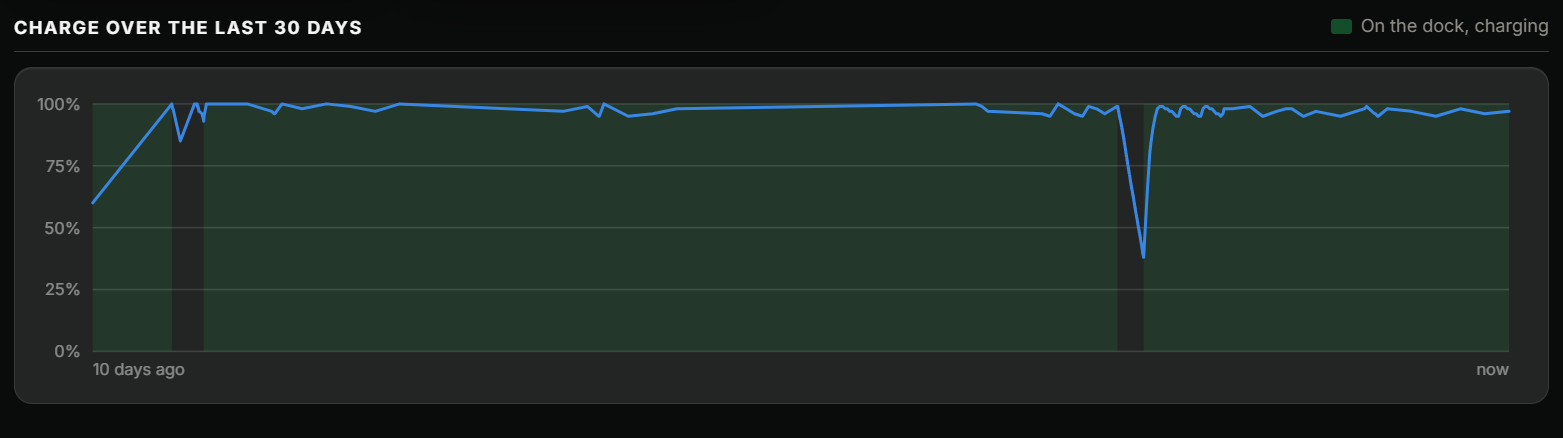
Watching the battery percentage drop on the rover according to Yardstick while the Yarbo app remains at 100%. (@Bryan.Wheeler explained that in another post earlier.)
I know the rover will drain its battery kinda quickly while sitting idle, but this leads me to ask:
Does Yardstick increase the power consumption of the rover? Does the pinging for information on a regular basis prevent a “sleep mode” in the rover?
I found this bit of helpful text in the GUI (a big +1 for the unobtrusive documentation right there with a click):
Record less while parked
Thins idle readings to one every 30 seconds.
A docked robot keeps reporting its position about twice a second all day, and over a month those idle hours cost more disk than the mowing does. This thins them to one reading every 30 seconds. Charging, faults, and the moment it sets off are always recorded in full.
I take this to mean that the bot is always chatty and awake anyway. So I’m thinking that Yardstick has no real impact on the rover’s power use.
Now that I can “see” what the battery is doing (thanks to Yardstick), it seems that the rover is discharging a little and getting into charging mode more for me starting around October 10th (that big dip was a mow on the 11th). I’m often seeing the green light blinking now. Could it be the cooler temperatures triggering the battery to keep itself warm? Something else going on?