Just an idea.
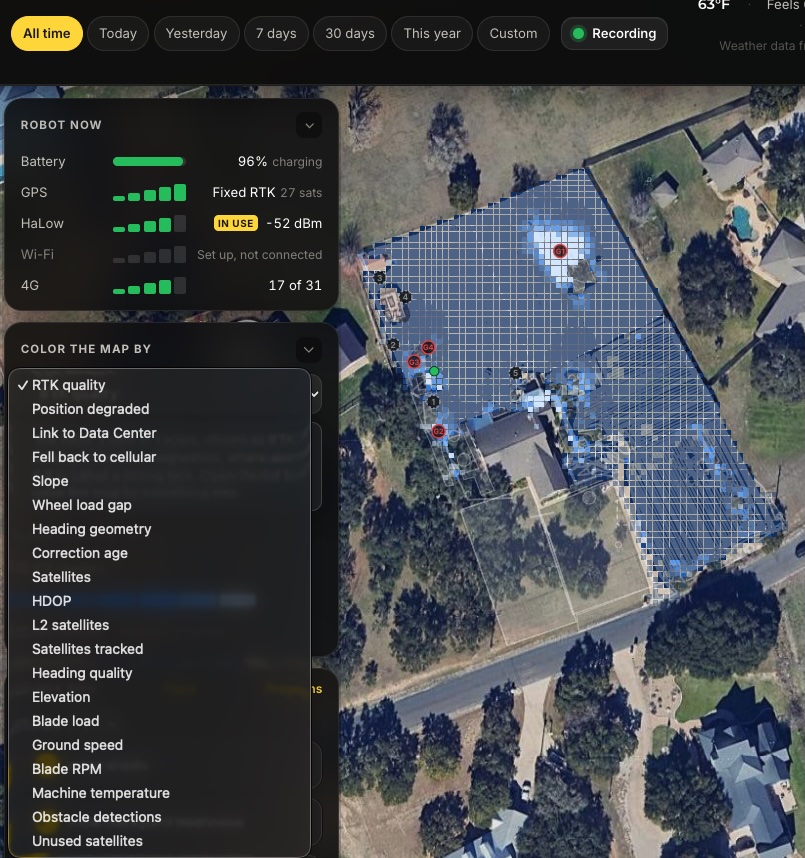
I would love to know where (2.4 Ghz) reaches in my yard.
Is it possible to add WiFi signal to the main map?
1 Like
Hi @Fiona,
We love feature requests like this one, because this one is already available to you. You just need to turn Wi-Fi on.
In your screenshot, the Robot now panel shows Wi-Fi as “Set up, not connected”, so your robot isn’t using your Wi-Fi yet. Once it’s connected in the Yarbo app, Yardstick picks up the Wi-Fi signal everywhere in your yard that has coverage as the robot works.
Then two new options appear under Color the map by:
- Wi-Fi signal: how strong your Wi-Fi is in each square, on a 0 to 100 scale.
- On Wi-Fi: where the robot was connected over your Wi-Fi.
They only show up once the robot has used Wi-Fi, which is why you don’t see them in the list today. Squares fill in wherever your Wi-Fi reaches, so after a few runs you’ll have your 2.4 GHz coverage map.
2 Likes
Thank you!